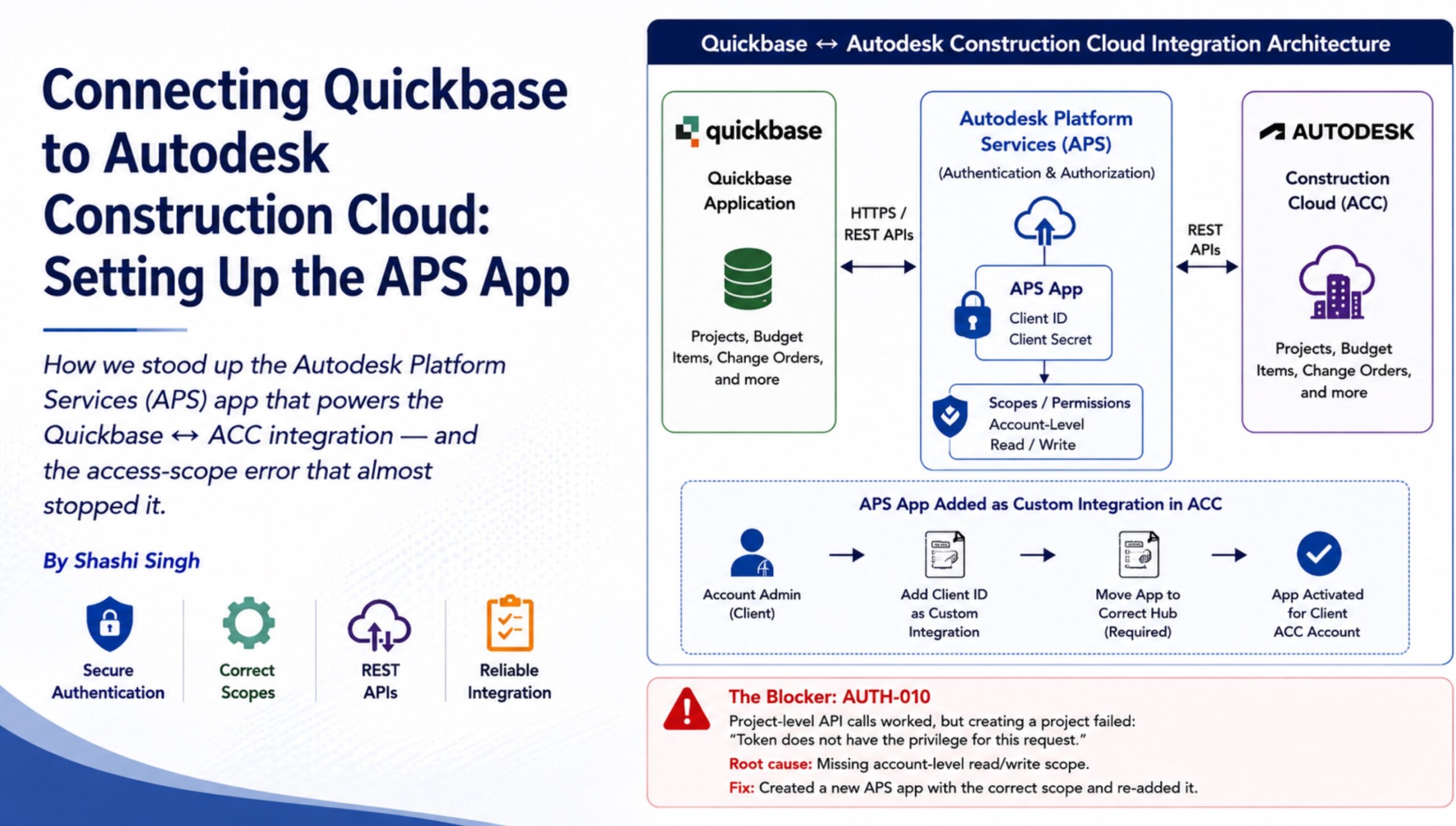
How the Autodesk Platform Services app powers a Quickbase ↔ ACC integration – and the access-scope issue that nearly blocked project creation.
The Starting Point
Every Quickbase-to-Autodesk Construction Cloud (ACC) integration starts with identity and authorization. Before a single API call can move project data, Quickbase needs to exist as a recognized application inside Autodesk’s identity layer – Autodesk Platform Services (APS, formerly Forge).
Autodesk’s recommendation, confirmed during the engagement with its Strategic Partnerships team, was to treat the integration as a two-track decision:
- Custom integration (fast path): Create an APS app, then have the customer add that app’s Client ID as a custom integration inside the ACC account.
- App Store listing (long-term path): Publish the integration to the Autodesk App Store so it can eventually be installed through the ACC App Gallery.
For an active client rollout, the custom-integration path provides the quickest route to working APIs, so that was the approach used first.
Step 1: Register the App in APS
The application is registered in the APS developer portal following Autodesk’s ACC getting-started flow. Registration generates the credentials required by subsequent API calls:
- Client ID
- Client Secret
App registration should not be treated as a formality. The scopes and permissions associated with the application determine what an authenticated token is actually allowed to do. A token can be valid and still lack the privilege required for a specific Admin API operation.
Step 2: Add the App as a Custom Integration in ACC
After the APS app exists, the client-side ACC administrator adds the application’s Client ID under Account Admin → Custom Integrations. This grants the APS application visibility into the customer’s ACC account rather than leaving it as an isolated developer registration.
There is also a second activation step that can be easy to overlook: the application must be moved to the correct Hub. In practice, the app is opened from the APS hubs/applications area and assigned to the target hub. A correctly scoped application that is not associated with the correct hub may still be unable to see or create the expected ACC resources.
| Integration Setup Flow |
| APS App Registration → Client ID / Client Secret → ACC Custom Integration → Correct Hub Assignment → OAuth Token → ACC APIs |
The Blocker: AUTH-010
After registration and custom-integration setup, project-level API calls such as fetching projects and working with Change Orders were successful. However, the Admin API call used to create a new project consistently failed with the following response:
{
“developerMessage”: “Token does not have the privilege for this request.”,
“moreInfo”: “https://aps.autodesk.com/en/docs/oauth/v2/developers_guide/error_handling/”,
“errorCode”: “AUTH-010”
}
The same behavior was reproduced independently from both the Quickbase Pipeline and Postman against the project-creation endpoint:
POST https://developer.api.autodesk.com/construction/admin/v1/accounts/{accountId}/projects
The diagnostic pattern was important: reads worked, and write operations against sub-objects inside existing projects worked, but creating a project did not. That strongly indicated an authorization/privilege issue rather than a malformed payload or incorrect endpoint.
| Root Cause |
| The original APS application was not provisioned with the account-level read/write privilege required by the Admin API project-creation operation. |
| Resolution |
| A new APS application was created with the required account-level read/write scope and added again as the ACC custom integration. Project creation then succeeded and was validated with test projects in the live ACC account. |
The Second Half of Project Creation: Adding the Project User
Resolving AUTH-010 exposed another important behavioral detail. Newly created ACC projects were defaulting to the same contact person for notifications, regardless of the actual project owner in Quickbase.
Autodesk support identified this as expected Admin API behavior: creating a project does not automatically add the appropriate project member. ACC can therefore fall back to the first member in the account’s Members list as the default contact.
The reliable implementation is therefore a two-call workflow:
- POST Create Project – create the ACC project and capture the returned project identifier.
- POST Add Project User – add the correct creator/owner as a member of the newly created project.
| Project Creation Pattern |
| Quickbase Project → POST Create ACC Project → Capture Project ID → POST Add Correct Project User → ACC Project Ready |
Takeaways for Anyone Standing Up an ACC Integration
- Scope the APS app deliberately. Successful authentication does not prove the token has account-level write access. Validate the privilege required by the specific Admin API operation.
- App registration and Hub assignment are separate concerns. Both must be correct for the application to operate against the intended ACC account/hub.
- Treat project creation as a two-call process. Creating the project alone may leave ACC using an unintended default contact; add the correct Project User explicitly.
- Do not use successful reads or Change Order writes as proof that project creation will work. Admin API project creation has its own privilege requirements and should be tested directly.
- Use independent tools such as Postman during troubleshooting. Reproducing an error outside Quickbase helps separate Pipeline/payload issues from platform authorization issues.
The Bigger Integration Lesson
This engagement reinforced an important principle of enterprise integration engineering: authentication success is only the beginning. Identity, application registration, scopes, account-level privileges, hub assignment, API behavior, and object-level workflows all need to align before an integration is truly production-ready.
The most valuable troubleshooting signal was not simply the AUTH-010 error itself, but the contrast between what worked and what failed. Existing-project operations succeeded while project creation failed, allowing the problem to be narrowed to Admin API privileges rather than the business payload.
With the appropriate APS configuration and the two-step project-creation pattern in place, Quickbase and Autodesk Construction Cloud can work together as a reliable connected project-data architecture.
| Architecture Principle |
| Authenticate correctly. Scope deliberately. Assign the correct Hub. Test privileged operations directly. Model multi-call workflows explicitly. Then build the synchronization around the platform’s actual behavior. |