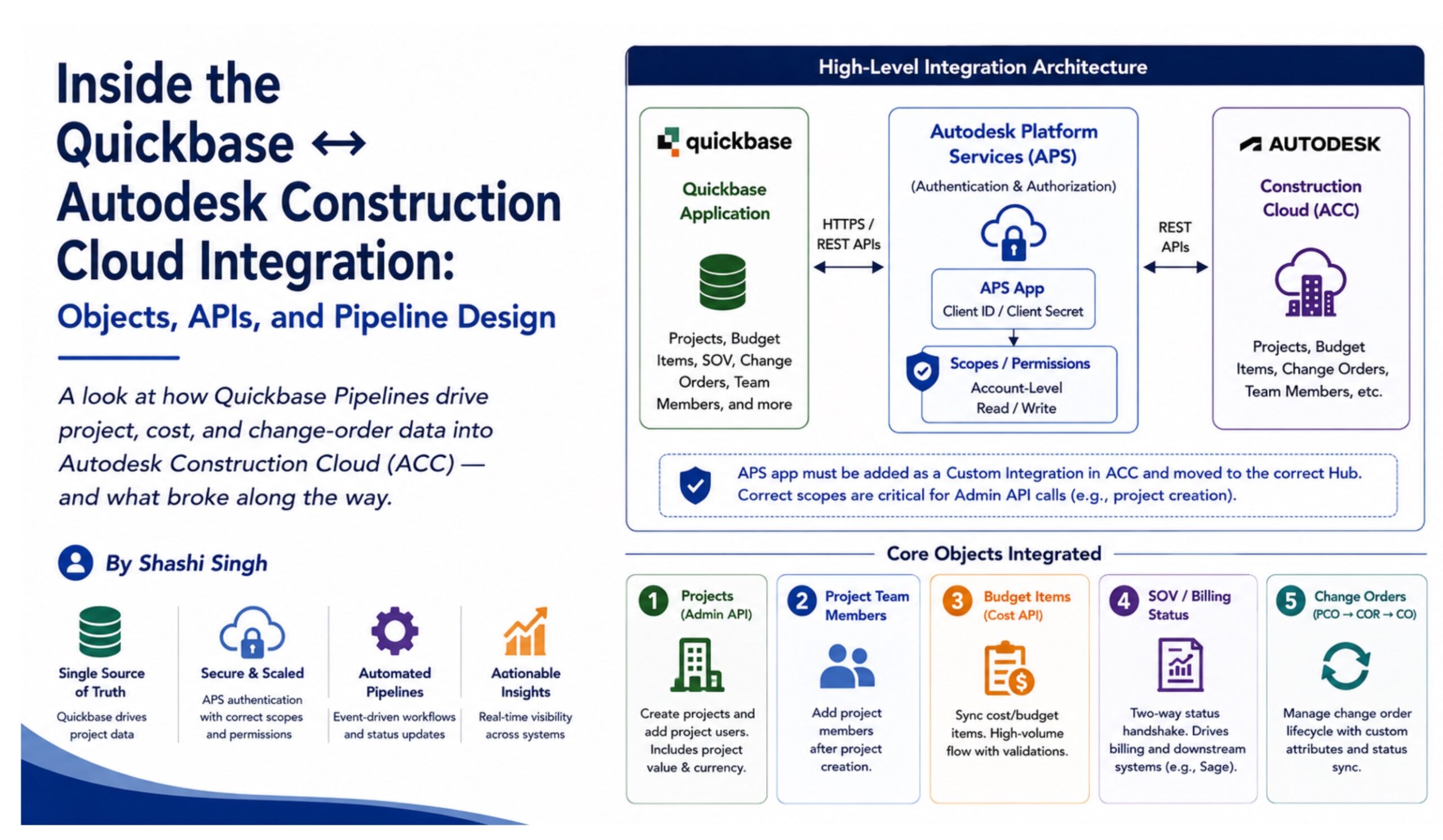
A look at how Quickbase Pipelines drive project, cost, and change-order data into Autodesk Construction Cloud (ACC) for a construction organization — and what broke along the way.
Why Quickbase + ACC
The construction organization runs project and job data in Quickbase but needs that data reflected in Autodesk Construction Cloud, where field and project-management teams work day to day. Rather than maintaining the same information in two places, the integration was designed so Quickbase acts as the system of record and pushes updates into ACC through REST APIs, orchestrated entirely with Quickbase Pipelines and without external middleware.
Once the Autodesk Platform Services (APS) application was registered and given the required scopes, the implementation became an exercise in understanding the ACC object model, selecting the correct API for each business process, sequencing dependent calls, and building pipeline logic that could handle both expected workflows and real-world edge cases.
Core Objects Integrated
1. Projects — Admin API
Projects form the foundation of the integration. When a new project or job is entered in Quickbase, the pipeline calls the ACC Admin API to create the corresponding project:
POST /construction/admin/v1/accounts/{accountId}/projects
Project creation is not a single-call workflow. ACC requires a follow-up Project User call so that the correct creator or owner is added to the project rather than allowing ACC to fall back to a default account member.
A later mapping issue demonstrated another important integration lesson. The Sell Price / Project Value was initially sent under an incorrect API object or attribute name. The pipeline could complete without an obvious pipeline-level error while the expected project still failed to appear correctly in ACC. Correcting the mapping resolved the issue and reinforced the need to validate the resulting ACC record, not just the pipeline execution status.
Currency also needs to be treated deliberately. If Project Value can use multiple currencies, Quickbase should hold an explicit currency value using Autodesk-supported currency codes rather than relying on a free-text symbol or a fixed USD assumption.
2. Project Team Members
Project Team Members entered in Quickbase must be reflected on the corresponding ACC project. This is handled through the Project Users endpoints after project creation. Because members can also come from ACC project templates, UAT must distinguish between users added by the integration and users inherited from the template.
3. Budget Items — Cost Management API
Budget Item synchronization is a higher-volume flow. The Quickbase Pipeline “Shashi – Autodesk Integration Quickbase – All Budget Items” processes cost data into ACC. At this stage, failures are more commonly caused by record-level validation — missing required cost fields, incorrect references, or mismatched line data — than by authentication or APS scope problems.
4. Schedule of Values (SOV) / Billing
SOV and billing integration uses a status-driven handshake between ACC and Quickbase:
- An SOV in ACC moves to In Review.
- The pipeline detects In Review and updates Quickbase: SOV Ready for Billing = Yes and stamps the PM Billing Ready Date.
- When billing is finalized in Quickbase using the Billing Complete Creation Date and B-Billing Finalized flag, the integration should move the ACC SOV from In Review to Approve.
This workflow also demonstrates the risk of multi-hop integrations. The ACC Approve status feeds Sage through hh2’s iPaaS layer. If the In Review → Approve transition does not occur, the downstream Sage synchronization does not start. Testing therefore has to validate the full Quickbase → ACC → hh2 iPaaS → Sage chain, not only the first integration hop.
5. Change Orders — PCO → COR → CO
Change Orders are the most stateful objects in the integration. The ACC lifecycle progresses through Potential Change Order (PCO), Change Order Request (COR), and finally Change Order (CO). The Quickbase design mirrors these as separate records/tables rather than flattening the lifecycle into a single record, preserving the audit trail as the change progresses.
- PCO — initial/draft-stage request.
- COR — formalized change-order request.
- CO — approved/executed change order.
Custom attributes such as GC CO # and CO Approval Status are synchronized back to Quickbase. For example, an ACC approval status such as “Approved For Signature” can update PM Approval – Approved for Signature (ACC) and PM Approved Date in Quickbase. This model improves traceability but also means troubleshooting must identify whether an issue belongs to the PCO, COR, or CO stage.
Pipeline Design Patterns That Matter
Sequential Dependent Calls
Some ACC operations must happen in a strict order. Project creation must be followed by Project User creation, while the change-order lifecycle can require PCO → COR → CO sequencing. These calls are chained within the pipeline so downstream operations only run after the required upstream object exists.
Status-Driven Triggers
Rather than relying entirely on polling, many integration actions are driven by status changes. SOV and change-order status changes become business events that trigger the corresponding synchronization or Quickbase update.
Silent Failure Risk on Field Mapping
The Sell Price incident is an important reminder that a completed pipeline run is not sufficient evidence of a successful business transaction. Incorrect attribute names or object mappings can produce silent or non-obvious failures. Every new field mapping should therefore be tested by validating the actual target record in ACC.
Multi-Hop Downstream Dependencies
Where ACC is an intermediate system feeding another platform, an integration cannot be considered complete until the downstream dependency has also been verified. Billing is the clearest example: a missed ACC status transition can prevent Sage from receiving the transaction even though the Quickbase-to-ACC portion appears healthy.
Summary of Objects and API Areas
| Object | ACC API Area / Endpoint | Direction | Key Design Note |
| Project | Admin API /construction/admin/v1/accounts/{accountId}/projects | Quickbase → ACC | Requires follow-up Project User call. |
| Project User | Admin API / Project Users endpoints | Quickbase → ACC | Adds correct owner/team members. |
| Budget Items | Cost Management API | Quickbase → ACC | Higher-volume; sensitive to validation and references. |
| SOV / Billing Status | Cost Management API | Bi-directional | Status handshake; downstream Sage dependency via hh2. |
| PCO / COR / CO | Change Order APIs + custom attributes | Bi-directional | Lifecycle mirrored in separate Quickbase records for auditability. |
Key Takeaways
- Use the correct ACC object and API area for each business process; similar-looking objects can have different privilege and validation requirements.
- Treat dependent API operations as ordered workflows, not independent calls.
- Validate the target record in ACC after every new mapping; pipeline completion alone does not prove the business operation succeeded.
- Mirror stateful ACC lifecycles such as PCO → COR → CO when auditability and troubleshooting matter.
- For multi-hop flows, test end to end across Quickbase → ACC → downstream platforms such as Sage.
The Bigger Integration Lesson
This integration is more than moving data from Quickbase to ACC. The real engineering work is understanding the platform object model, selecting the correct endpoints and permissions, sequencing API calls, validating field mappings, and designing pipelines that remain understandable when something fails. A low-code orchestration platform such as Quickbase Pipelines can support sophisticated enterprise integration patterns, but the same architectural discipline required for custom middleware still applies.
Part of a series on the Quickbase ↔ Autodesk Construction Cloud integration built for a construction organization. The companion article covers creating, scoping, and activating the APS application that authenticates these API calls.