Enterprise integration is not only about moving data between systems. A production-ready solution also needs a strategy for authentication, certificate lifecycle management, deployment, monitoring, troubleshooting, and long-term operational ownership.
One of the more interesting enterprise integrations I have worked on is Quickbase ↔ ADP Workforce Now, particularly because authentication and long-term certificate management are just as important as the actual data synchronization.
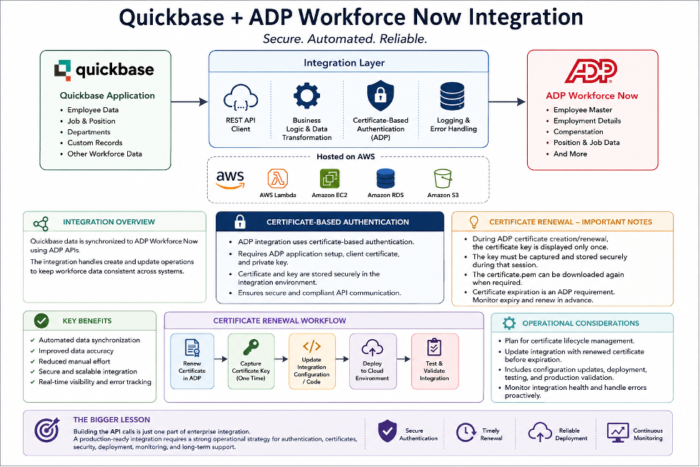
At a high level, the integration architecture can be represented as:
Quickbase → Integration Layer → ADP Workforce Now
Employee and other workforce-related data can then be synchronized through ADP APIs while the integration layer manages authentication, transformation, logging, error handling, and operational controls.
Authentication Is a Critical Part of the Architecture
Unlike a simple API integration where you only manage an API key or OAuth token, ADP integrations can require certificate-based authentication. The certificate therefore becomes part of the architecture and, more importantly, part of the integration’s operational lifecycle.
- ADP application credentials
- Client certificates
- Private certificate keys
- Secure certificate storage
- Certificate expiration and renewal
- Updating the integration when certificates change
These elements need to be considered during the initial design rather than treated as an afterthought after go-live.
One Important Lesson During Certificate Renewal
During ADP certificate creation or renewal, there is a particularly important operational step: the certificate key is displayed only once.
The certificate key must be captured and stored securely during the renewal session. Once that step has passed, the key cannot simply be viewed again.
The certificate.pem file, on the other hand, can be downloaded again when required. This is why I prefer performing certificate renewal together with the client rather than simply sending instructions. A short working session can prevent a small missed step from becoming a much larger integration issue.
Certificate Expiration Is an ADP Requirement
Certificate renewal is an ADP-side requirement, not something introduced by the integration itself. During the initial implementation, the role of the certificate and its expiration should be clearly explained. ADP also displays certificate validity and expiration information when the certificate is created.
As the certificate approaches expiration, the integration team needs to plan the renewal and update the integration with the renewed certificate information before the existing certificate becomes invalid.
What Happens After Renewal?
Renewing the certificate in ADP is only part of the process. If the certificate is used by the integration code for authentication, the technical workflow can include:
Renew Certificate → Capture Required Key → Update Configuration/Code → Deploy → Test → Validate
Depending on how the integration is hosted, this may require updates to the application running in the cloud environment. Even when the code change is relatively small, the complete operational effort should account for:
- Configuration or code updates
- Deployment
- Authentication validation
- Integration testing
- Production verification
- Rollback planning, if required
Hosting & Integration Architecture
For enterprise integrations like this, I have worked with AWS-hosted integration components where custom code acts as the bridge between Quickbase and the external platform. This provides greater control over the operational characteristics of the integration.
- Authentication and certificate handling
- API communication
- Data transformation and business logic
- Logging and error handling
- Scheduling and retries
- Troubleshooting and operational support
Depending on the requirements, the implementation may use technologies such as .NET/C#, Node.js, AWS Lambda/EC2, REST APIs, SQL, and Quickbase APIs/Pipelines. The right architecture should be selected based on the integration’s security, scale, reliability, and support requirements.
The Bigger Lesson
Building the API calls is only one part of enterprise integration engineering. A production integration also needs an operational strategy for:
Authentication → Credentials → Certificates → Expiration → Renewal → Deployment → Monitoring → Support
An integration that works perfectly today can stop working tomorrow if certificate lifecycle and operational ownership are not considered during the original architecture.
That is one of the key differences between simply connecting two APIs and designing an enterprise integration that can be supported reliably for years after go-live.