A lightweight integration pattern using Quickbase Pipelines and SAP Cloud Integration (CPI)
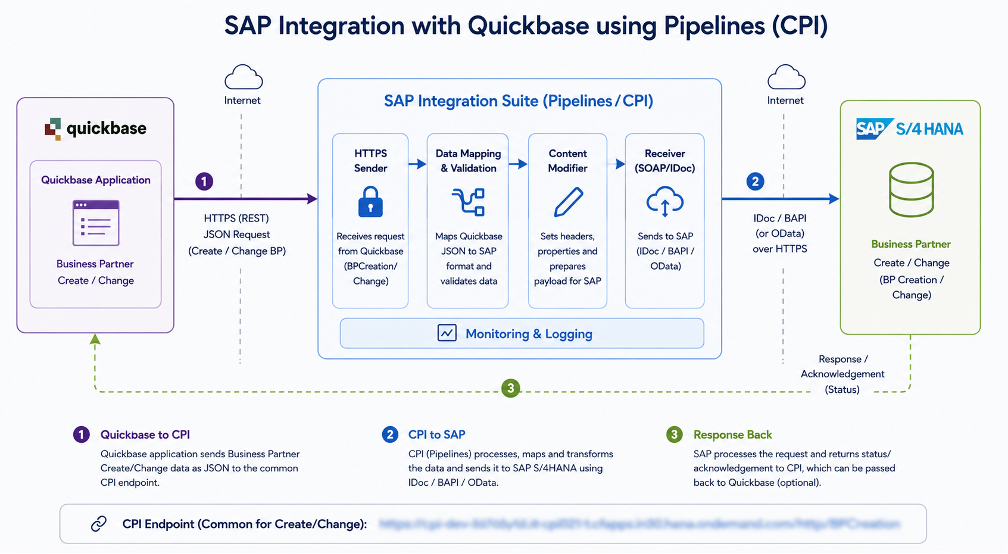
Executive summary. The integration discussed in the project email thread uses Quickbase Pipelines as the orchestration layer between a Quickbase application and SAP Cloud Integration (CPI). Quickbase prepares a JSON request and calls CPI over HTTPS. CPI exposes the integration endpoint and passes the transaction into the SAP-side implementation. The confirmed business interfaces in the thread are Purchase Order (PO) Creation, PO Change, Business Partner (BP) Creation, and BP Change. By July 4, 2024, NTT DATA reported that the BP Creation/Change CPI interface had been completed and tested successfully through Postman, with a common CPI URL for both BP operations.
1. Integration Context
The objective is to connect operational data maintained in Quickbase with SAP without requiring users to re-enter the same transaction in both systems. Quickbase Pipelines provides the automation and API-calling capability, while SAP CPI provides the controlled integration boundary into SAP. This separates the Quickbase application from SAP-specific implementation details and gives the teams a defined interface contract based on a shared JSON structure.
2. High-Level Architecture
Quickbase application
Users create or change business data in Quickbase. For the BP flow, the application supplies the Business Partner information that must be created or changed in SAP.
Quickbase Pipelines
A Pipeline detects or receives the relevant Quickbase event, assembles the agreed JSON payload, and invokes the CPI endpoint over HTTPS. The email thread explicitly states that the PO Creation URL had already been integrated into Pipelines.
SAP Cloud Integration (CPI)
CPI acts as the integration gateway. The SAP team generates the URL, tests the interface, and provides the endpoint and JSON request/schema to the Quickbase team. For BP Creation and BP Change, the July 4 update states that one common CPI URL is used for both cases.
SAP-side processing
The SAP/ABAP and CPI teams implement and test the corresponding create/change functionality. The thread records PO Change development on the ABAP side and subsequent CPI testing before information is handed to the Quickbase team for UAT.
3. Transaction Flow
- Trigger in Quickbase: A create/change event or user action identifies a transaction that needs to be sent to SAP.
- Build the JSON request: The Pipeline maintains the agreed JSON structure. The SAP team specifically requested that the same JSON structure be maintained on the Quickbase side.
- Call CPI over HTTPS: Quickbase Pipelines sends the request to the CPI URL. The project thread shows this approach for PO Creation and later for BP Creation/Change.
- CPI and SAP process the transaction: CPI receives the request and routes it into the SAP-side implementation. Postman was used by the SAP team to validate the CPI interfaces before UAT.
- Return and validate status: The response can be used by the Pipeline to determine whether the transaction completed successfully and to support UAT, exception handling, or status updates in Quickbase. The email thread confirms testing and UAT activity but does not define the exact response schema.
4. Interfaces Identified in the Project Thread
| Interface | Status in thread | Integration note |
| PO Creation | Integrated / available for UAT | Quickbase team stated that the PO Creation URL had been integrated in Pipelines. |
| PO Change | Development completed; progressed through CPI testing/UAT handoff | ABAP-side completion was reported June 11, followed by CPI validation. |
| BP Creation | Completed and tested | A common CPI URL was provided for BP Creation/Change; Postman test reported successful. |
| BP Change | Completed and tested by July 4 update | Same common CPI URL as BP Creation; separate create/change behavior is handled by the interface. |
5. Why This Pattern Works
The design creates a clean separation of responsibilities. Quickbase owns the business application and Pipeline automation; CPI owns the external SAP integration endpoint; and the SAP team owns the SAP-side transaction logic. That division reduces direct coupling between Quickbase and SAP and makes interface testing easier because the same CPI endpoint can be exercised independently with tools such as Postman before the Pipeline is placed into UAT.
6. Operational Considerations
- Keep the JSON contract version-controlled. Changes to field names, required values, or nesting should be coordinated between the Quickbase and SAP teams before deployment.
- Protect CPI credentials and endpoint details. The endpoint in the accompanying diagram is blurred intentionally; production documentation should avoid exposing credentials or sensitive URLs unnecessarily.
- Capture request/response status in the Pipeline. This supports troubleshooting, reconciliation, and UAT evidence.
- Separate development, UAT, and production configuration so endpoint promotion does not require redesigning the Pipeline.
- Define error-handling and retry behavior explicitly. The supplied email thread does not specify the error schema, retry policy, authentication method, or SAP receiver protocol, so these should be documented as implementation details rather than assumed.
7. Conclusion
The SAP-Quickbase integration is a straightforward API-mediated architecture: Quickbase Pipelines prepares and sends a consistent JSON request to SAP CPI, and CPI provides the integration boundary into SAP. The project thread demonstrates an incremental delivery model in which each PO or BP create/change interface is developed on the SAP side, validated through CPI/Postman, handed to the Quickbase team, and then exercised in UAT. The resulting pattern is reusable for additional SAP transactions as long as the teams maintain a stable interface contract and clearly document endpoint, authentication, response, and error-handling requirements.