Understanding the difference between API data models and application behavior
While working on a QuickBooks Online (QBO) integration, I encountered an interesting limitation around creating Projects through the API. At first, the solution appeared straightforward: set Job = true when creating a Customer. After extensive testing, however, I found an important distinction between the API customer/job hierarchy and the Project entity users see in the QuickBooks Online Projects UI.
At First, It Looked Simple
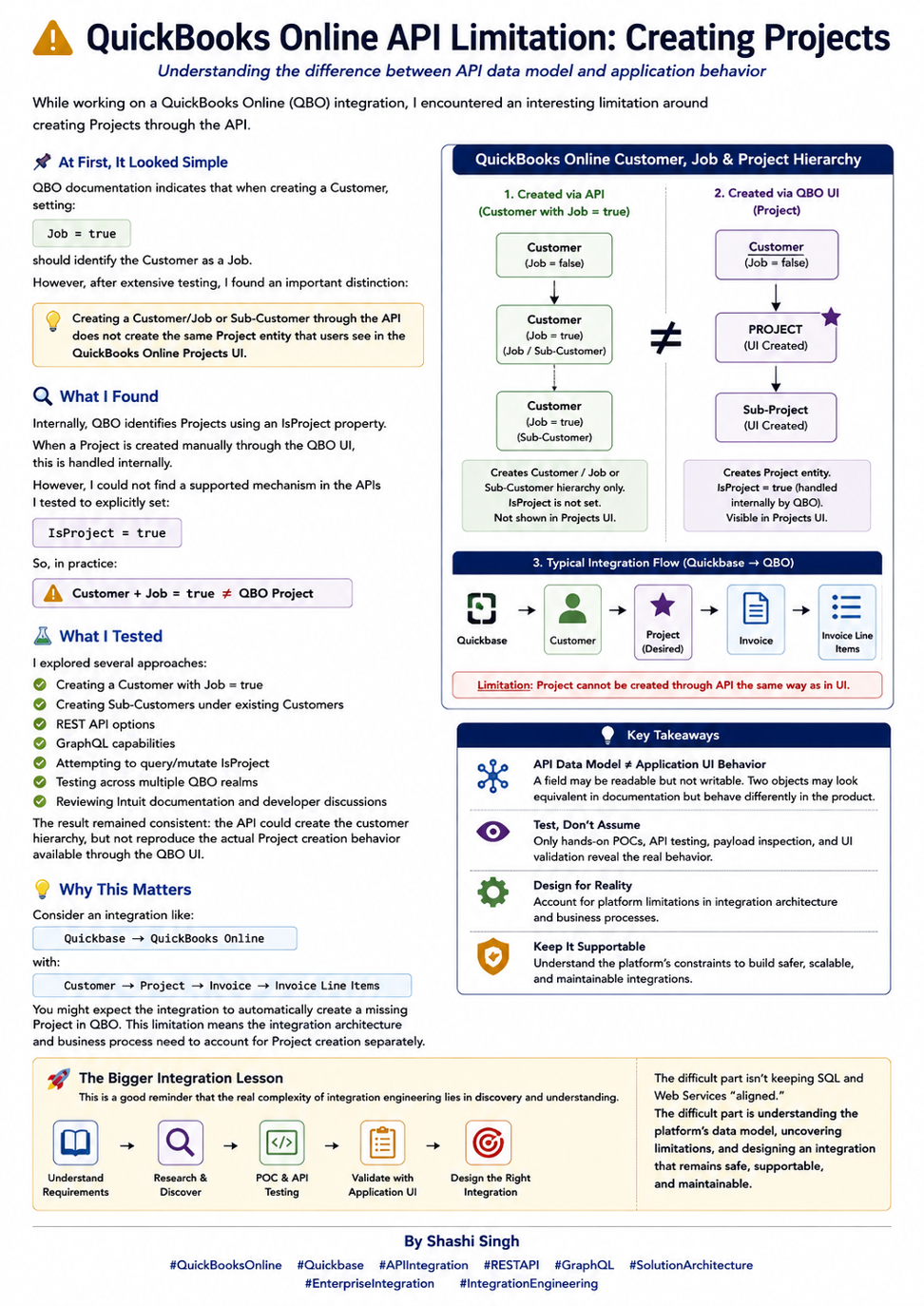
QBO documentation indicates that when creating a Customer, setting Job = true should identify the Customer as a Job. That is useful for creating a customer/job or sub-customer hierarchy, but my testing showed that it does not create the same Project entity exposed through the QuickBooks Online Projects UI.
Customer + Job = true ≠ QBO Project
What I Found
Internally, QBO identifies Projects using an IsProject property. When a Project is created manually through the QBO UI, this distinction is handled internally. In the APIs I tested, I could not find a supported mechanism to explicitly set IsProject = true.
The practical result is that an API-created Customer/Job or Sub-Customer may reproduce part of the hierarchy, but it does not behave as the same Project entity created from the QBO user interface.
What I Tested
- Creating a Customer with Job = true.
- Creating Sub-Customers under existing Customers to emulate the hierarchy.
- REST API options for Customer/Job creation and updates.
- GraphQL capabilities related to Projects.
- Attempting to query or mutate the IsProject property.
- Testing behavior across multiple QuickBooks Online realms.
- Reviewing Intuit documentation and developer/community discussions.
The result remained consistent across these tests: the API could create the customer hierarchy, but it did not reproduce the actual Project creation behavior available through the QBO UI.
Why This Matters for Integration Architecture
Consider a business integration with the following logical hierarchy:
Quickbase → QuickBooks Online
Customer → Project → Invoice → Invoice Line Items
A natural expectation is that the integration can create a missing Project automatically before synchronizing downstream transactions. This limitation means Project creation needs to be accounted for separately in the integration architecture and business process.
- Determine whether the required QBO Project already exists before downstream synchronization.
- Store and maintain the relevant QuickBooks references/IDs used by the integration.
- Avoid assuming that a Customer/Job or Sub-Customer is functionally equivalent to a QBO Project.
- Design clear exception handling for records that depend on a Project that has not yet been established in QBO.
API Data Model vs. Application UI Behavior
This scenario illustrates a broader integration principle: API data model ≠ application UI behavior. A field can be visible in responses but not writable. Two objects can look equivalent in documentation yet behave differently in the actual product. UI-created entities may also involve internal flags or business logic that are not exposed through public integration interfaces.
The Bigger Integration Lesson
Enterprise integration engineering is not just about reading documentation and constructing an API payload. Platform behavior needs to be validated against real business scenarios.
- Build focused POCs before committing to an architecture.
- Inspect request and response payloads rather than relying only on documentation.
- Test create and update behavior using realistic data.
- Compare API results with what users actually see in the application UI.
- Identify read-only/internal fields and platform constraints early.
- Design around confirmed product behavior rather than assumptions.
The real complexity often lies in discovery: understand the platform, validate its limitations, and design an integration that remains safe, scalable, supportable, and maintainable.
Conclusion
The QBO Project scenario is a useful reminder that successful integration architecture requires more than endpoint connectivity. The safest approach is to validate the platform through hands-on testing, document the confirmed behavior, and build the surrounding business process around what the API actually supports.
That discovery process – POCs, API testing, payload inspection, debugging, and UI validation – is often where the most valuable integration engineering work happens.